Custom Labels for Google Shopping
More control over PMAX and Shopping: With Custom Labels, you can organize your product feed, identify which products generate revenue and which consume budget. Label Up automates segmentation and ensures transparency, efficiency, and scalable performance.

The Custom Labels 0-4 bring order to your Google Shopping and PMAX campaigns
Google Performance Max (PMAX) has now become an integral part of many online marketing strategies. The automated campaign structure promises maximum reach with minimal management effort. However, the more Google optimizes, the less control you have. You see results – but not which products are actually delivering them. Particularly frustrating: Underperforming products often burn through valuable budget.
Despite the automation and scaling options that PMAX offers, many questions remain: Which products really perform? Where are you burning budget? And how do you get the most out of your feed?
The options listed by Google
Category
Product Type
Brand
Condition
Item ID
are not sufficient to maintain complete clarity about all product data.
The key to greater transparency: Custom Labels in the Google Merchant Center
What are Custom Labels in the Google Merchant Center?
Custom Labels are user-defined attributes in the product feed of your Google Merchant Center. They help you better segment product groups and gain full control over Google PMAX and Shopping campaigns.
The data and attributes of the products are presented in tabular form in the product data feed. In addition to the options defined by Google, there are 5 Custom Label Slots (custom_label_0 to custom_label_4) available.
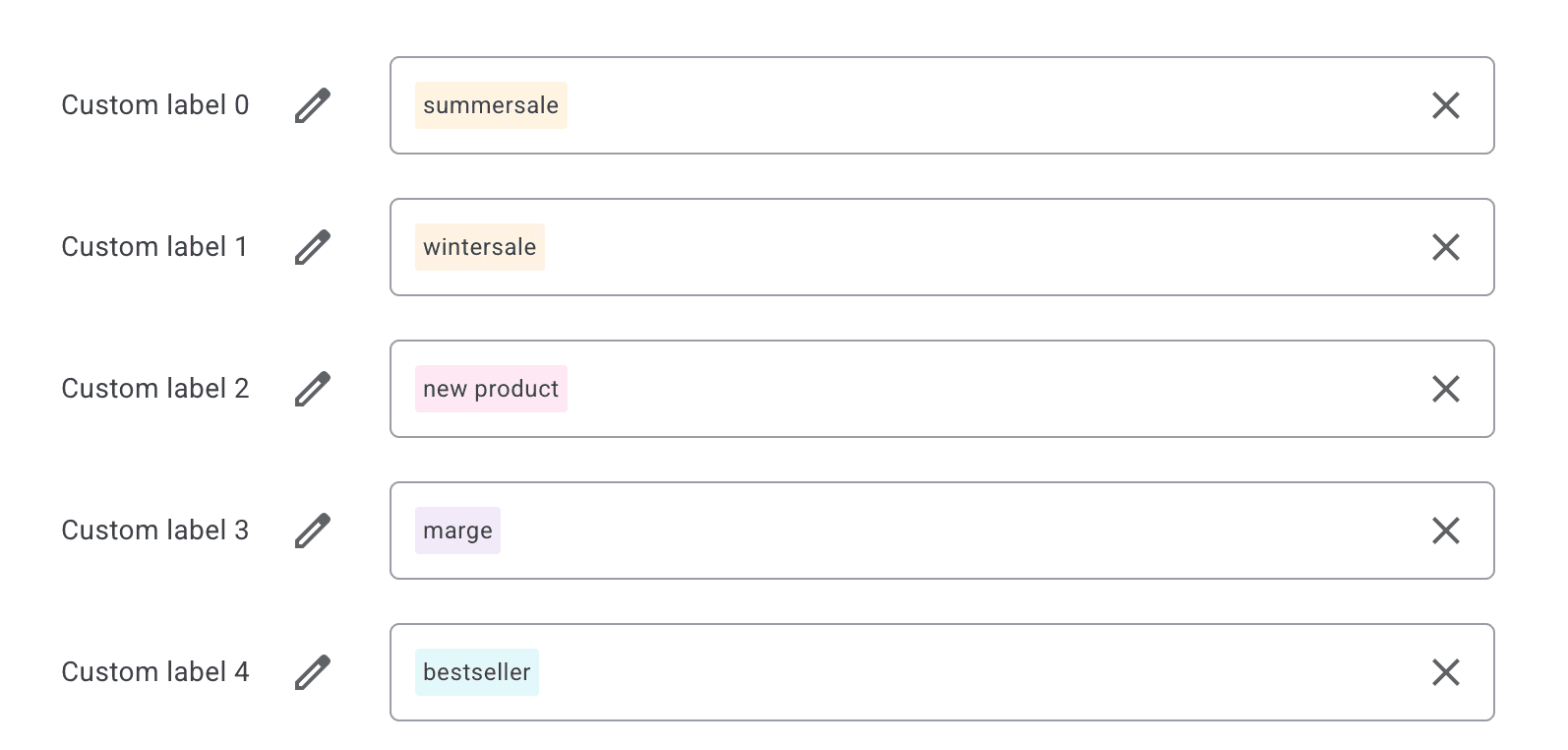
These slots can be assigned freely (e.g., “Winter 2025”, “Top Margin” or “Sale”) and enable you to specifically group and treat products within your Shopping or PMAX campaigns.
Differentiated Control thanks to Custom Labels
Custom Labels make invisible product characteristics visible – and manageable. Instead of treating all products equally, you can differentiate: High-performing products receive more budget, while low performers are reduced or excluded. This not only increases efficiency but also reduces wastage and sustainably boosts your ROAS.
Creating Custom Labels requires a high level of technical know-how. In addition to confusing scripts, there are more user-friendly solutions, such as the Label Up tool.
Using Custom Labels: The four Performance Labels from Label Up
In addition to independence and individual control, Custom Labels also offer you the opportunity to segment products by performance.
Label Up has made performance segmentation the core function of the tool. The four Performance Labels that can be created as templates in the app provide the basis for easy, effective, and scalable optimization of your Shopping and PMAX campaigns.
1. Champions
The Champions are your bestsellers and the stars of your feed. They generate the highest revenue with strong ROAS. The Champions should be the focal point of your campaign – they deserve full attention and optimal budget.
2. Potentials
Your Potentials hold real growth potential. These products deliver high ROAS but still have little traffic. With the right fine-tuning, they can become your next Champions.
3. Sleepers
Little visibility and little revenue - your Sleepers products are in a deep sleep. Wake them up and activate them specifically, or clean up your feed to minimize wastage.
4. Wasters
These products block your resources and deliver little to no results. They tie up budget that could perform better elsewhere. By identifying these products early, you can budget more efficiently and better support your Champions.
These labels are based on real-time data from your Google Ads account and help you quickly recognize which products deserve your budget – and which do not.

Self-defined Custom Labels for Google Shopping and PMAX
In addition to the four predefined Performance Labels, Label Up offers you the opportunity to create your own Custom Labels tailored to your goals. Play by your own rules and create labels customized to your KPIs.
The following additional segmentation options are available to you with Label Up:
Margin: Handle products with high vs. low margin differently.
Season: Specifically promote current seasonal items.
Stock: Push overstock, hold back scarce products.
Brand/Non-Brand: Distinction between manufacturer brands vs. private labels.
Price Categories: Fine control by price range (e.g., < 50 €, 50–150 €, >150 €).
AND/OR Rules for Maximum Flexibility
With the flexible AND/OR rules in the Labelizer, you can combine conditions, e.g., “ROAS > 600% AND Margin > 30%”. This allows you to create precise segments – completely without manual table work. The function also allows you to specify other Custom Labels as attributes.
Integration of Custom Labels for Google Shopping
With tools like the one from Label Up, the Custom Labels are added directly to the feed and can thus be easily integrated into the workflow. They can be used as user-defined labels or asset groups in campaigns. The linking of the data occurs by logging in with the Google Ads account in the Label Up app. Since Label Up only accesses data from Google Ads and Merchant Center, you always retain control over data usage. Once the app is linked to the Merchant Center, the automatic segmentation begins, which is updated daily. This update can also be triggered manually to keep the labels up to date at any time.
Implementation benefits at a glance:
|
|---|
Concrete tips for application and use cases can be found here.
Best Practice: Performance Boost through Custom Labels for Google Shopping
For clients of Label Up, a significant difference was noticeable after a short application period, and users reported:
Up to 30% higher ROAS through targeted budget allocation
Reduction of wastage by pausing inefficient products
Time savings in campaign management through clear performance segments
Easy handling and organization of the tool
More revenue through the targeted pushing of your Champions
Thus, AnalyticaA, a leading German performance marketing agency, also benefits from the new tool. For Holger Umling, Head of Performance Marketing at AnalyticaA, a increase in outcomes of around 40% was visible.
Conclusion: Custom Labels as a Gamechanger for Data-driven Campaign Management
If you really want to control PMAX, you need Custom Labels. They bring structure to your product feed, help you prioritize, and maximize the efficiency of your campaigns.
With Label Up, you not only get automated performance labels but also the flexibility to establish your own feed logic.
About
Label Up is a tech provider from Vienna that helps agencies and shops achieve better results with its own Google Shopping CSS and smart label-based optimization.

Other topics