What is a Keyword CSS?
Your own keyword under your Google Shopping Ads? As a Google CSS, you can decide which word is displayed under your ads.

A keyword CSS refers to a proprietary Google Comparison Shopping Service (CSS), meaning the technical infrastructure behind Google Shopping ads. Unlike Google Shopping Europe or third-party CSS, online shops and agencies with their own keyword CSS can freely choose a keyword to be directly placed in their shopping ads. This keyword appears under their shopping ad and contributes to brand awareness. Some users click on it and reach the associated price comparison page without additional click costs, from where they are directly forwarded to the shop.
Background: What is a Google CSS?
A Google CSS (Comparison Shopping Service) is a provider certified by Google through which Google Shopping ads are displayed. Google introduced the CSS model to create more competition in the shopping ecosystem and enable online shops and agencies alternative ways to display their product ads.
As a CSS partner, the margin from Google Shopping Europe is eliminated, allowing for CPCs to be up to 20% lower.
You can read the exact background of the Google Comparison Shopping Service here: What is Google CSS?
How does a Keyword CSS work?
When selecting your own keyword for your CSS, the following three steps occur in the frontend:
A freely chosen keyword (e.g., "Shopping Expert") or a name that suits your brand appears under the Google Shopping ad.
Approximately 2% of users click on this keyword and are directed to their own price comparison page. This happens for advertisers free of charge, without paying additional click costs (CPC).
The own price comparison page matches your brand's branding. Providers like Label Up arrange your products in front and offer the option to directly forward users to your shop.
What distinguishes a Keyword CSS from other CSS models?
The central difference lies in control:
Own keyword instead of “By Google” or “By third-party” on your website
Own branded price comparison page instead of a generic third-party platform
Free clicks on the keyword
Targeted redirection from the price comparison page to the shop
Your products in the spotlight
This clearly sets the keyword CSS apart from agency and third-party CSS.
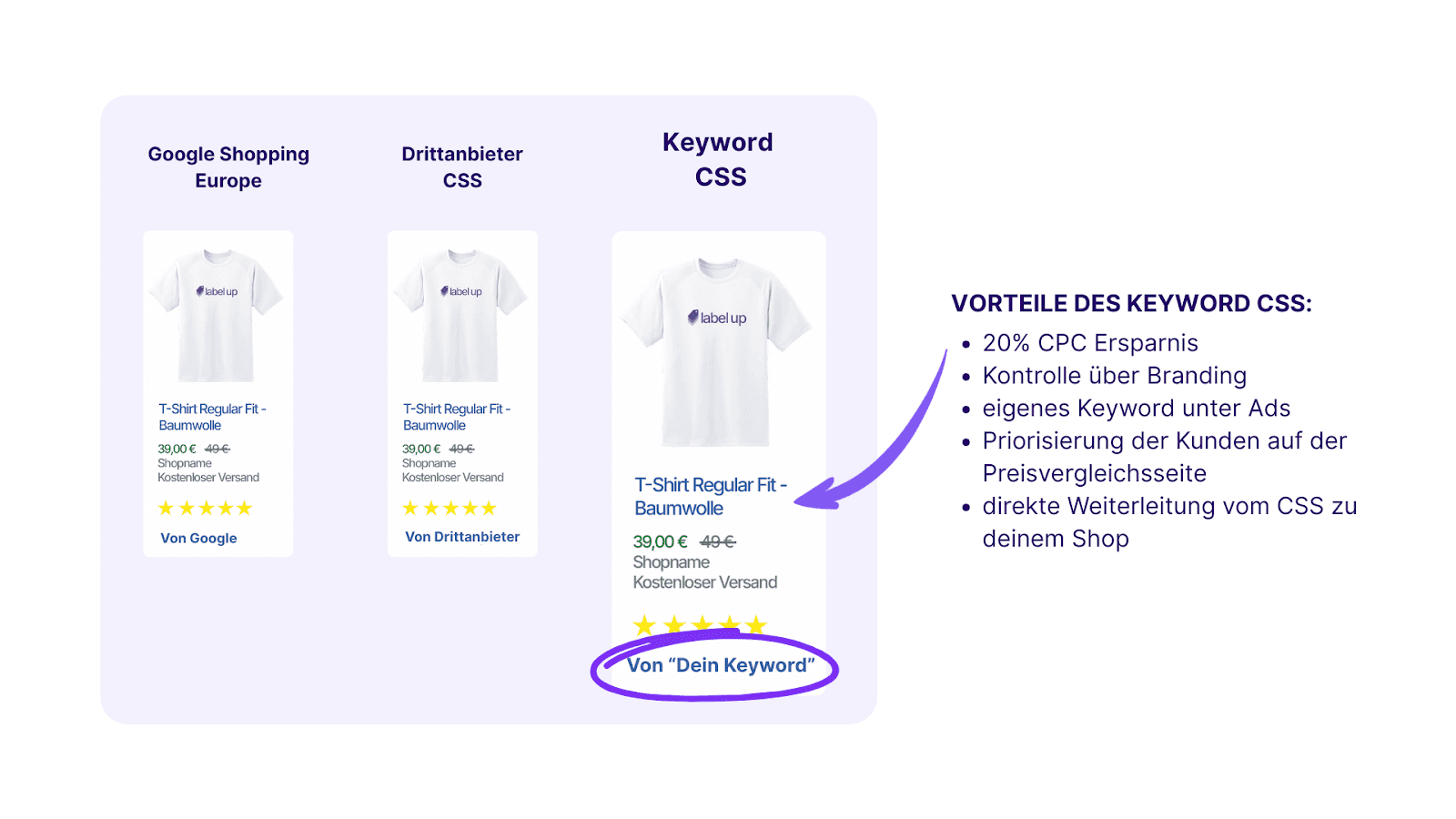
Benefits of a Keyword CSS for Online Shops and Agencies
For online shops, a Keyword CSS offers several benefits:
Additional, free clicks on the price comparison page
Direct forwarding to their own shop
Up to 20% lower CPCs
Full control over visibility and branding
Transparent data and clear user guidance
Here you can find a practical example from Wellcosan GmbH, which uses its own CSS for its shops: Wellcosan Keyword CSS
A Keyword CSS also offers clear benefits for agencies:
Own CSS infrastructure without dependency on third parties
Scalable for multiple clients
Individual keyword strategies per client
More control over campaign environment and performance
Thus, the CSS transforms from a pure cost factor into a strategic asset.
The leading agency AnalyticaA was able to achieve significant results with its own agency CSS; read here what they were able to improve: AnalyticaA activates ad boost
When is a Keyword CSS particularly sensible?
In these cases, a Keyword CSS clearly outperforms other CSS models:
20% CPC savings AND free clicks on the keyword
Priority for your own shop or client products
Long-term Google Shopping scaling
Focus on branding and user experience
Support for multiple shops at agencies
Redirection from the price comparison page directly to the shop
No dependencies on third parties
Are there any limitations with Keyword CSS?
A Keyword CSS requires:
An initial setup
An own price comparison page
Strategic planning of the keyword
However, these points can be efficiently realized with providers like Label Up and are usually quickly amortized.
Conclusion: What is a Keyword CSS?
A Keyword CSS is a powerful and scalable solution for online shops and agencies looking to strategically utilize Google Shopping. It combines cost savings, free additional traffic, and full control over visibility and branding. For many shops and agencies, having their own Keyword CSS is therefore the best long-term option in the Google Shopping environment.
Collaboration with Label Up allows online shops and agencies to implement their own Keyword CSS without technical effort. The process is clearly structured: The desired keyword is defined, and the implementation is carried out by Label Up. This allows for the establishment of a own price comparison page without having to tie up internal development resources.
This guide was created by the e-commerce experts at Label Up. We assist agencies and shops in operating their own price comparison page (Google CSS) and optimizing their Google Shopping campaigns in a data-driven manner.
About

Label Up is a tech provider from Vienna that helps agencies and shops achieve better results with its own Google Shopping CSS and smart label-based optimization.

Other topics