What is the best Google CSS?
Individual requirements vs. holistic solution: What requirements should your Google CSS meet and which solution has established itself as "the best Google CSS"?

The best Google CSS for online shops is the one that reduces costs in the long term, creates additional visibility, and allows full control over traffic and redirects. While Google Shopping Europe and third-party CSS may be suitable for certain scenarios, a proprietary keyword CSS meets these requirements in the most comprehensive way.
A proprietary keyword CSS allows shops and agencies to place a freely chosen keyword under Google Shopping ads, redirect users to their own price comparison site, and benefit from the financial advantages of a Google CSS partner at the same time. This combines efficiency, scalability, and independence and is considered the most powerful CSS variant by many online shops and agencies.
The following article shows you what Google CSS is, what types exist, and which CSS fits your needs best.
What is a Google CSS?
A Google CSS (Comparison Shopping Service) is a price comparison site that technically enables the placement of Google Shopping Ads. Instead of running exclusively through Google Shopping Europe, online shops can also run their Shopping campaigns through third parties or as CSS partners.
The background: Google introduced the CSS model to enable more competition in the Google Shopping ecosystem. Since then, shops can choose which price comparison site they enable for their Shopping Ads.
What types of Google CSS are there?
In principle, three CSS types can be distinguished:
Google Shopping Europe (Google's standard CSS)
The Google Shopping Europe CSS is Google's standard price comparison service and is automatically used when no alternative CSS is connected. While this solution is straightforward, it does not provide a real performance lever: there is no control over structure, data, or strategic further development. Therefore, for agencies and growth-oriented shops, the Google CSS is often only a transitional solution. Furthermore, when using Google Shopping, up to 20% of the click costs (CPC) are charged as a margin.
2. Third-party CSS
A third-party CSS allows for a cost-effective entry into the CSS model without any technical effort. The main reason agencies and shops choose this model is the saving of the 20% click cost margin from Google Shopping Europe. However, by choosing this option, shops and agencies hand over a central part of their shopping infrastructure to an external provider. In practice, this means: limited transparency, restricted customization options, and a certain dependency on the CSS partner. This solution is suitable for quick tests, but often not very sensible for long-term scaling.
3. Whitelabel-CSS (own keyword CSS)
A whitelabel solution allows agencies or shops to operate their own CSS under their own brand. It is often referred to as keyword CSS because it enables agencies and shops to place their chosen keyword under their ads. A click on this keyword redirects users for free to the price comparison site that displays their own products and can be tailored to the shop's branding.
In contrast to third-party solutions, ownership remains entirely with the company here. The initial effort is higher, but this variant offers maximum control, independence, and strategic scope. For agencies and larger shops, whitelabel CSS is usually the most sustainable solution in the long term. Label Up supports shops and agencies that want to become their own CSS partners with a 100% Google-compliant setup and emphasizes personalized branding.
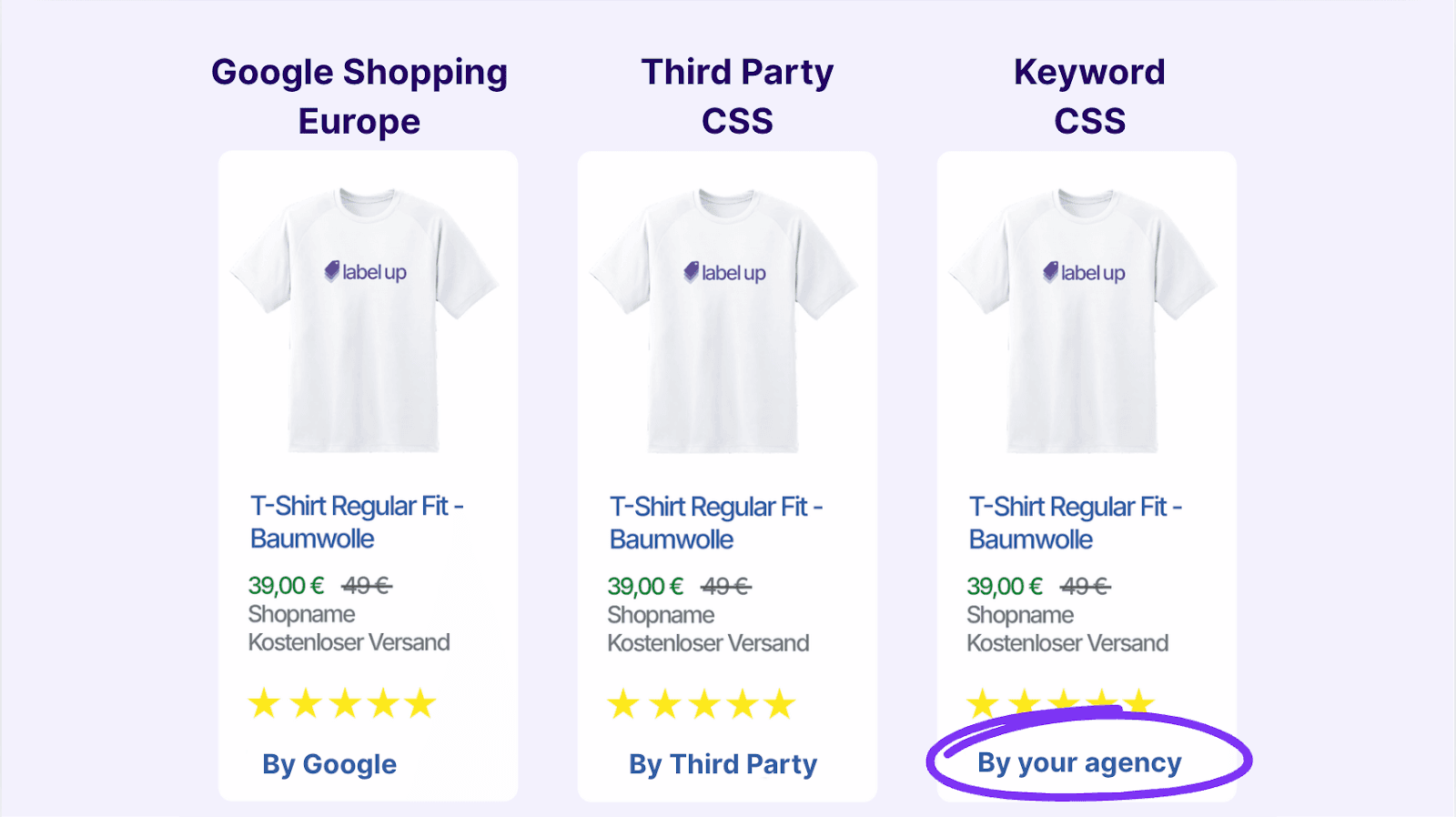
What is the difference between Google Shopping Europe, third-party providers, and a keyword CSS?
Technically, the campaign setup does not change much. The crucial difference lies in
who appears as CSS,
how the click costs are calculated,
and where users are redirected.
As a Google CSS partner, the margin from Google Shopping Europe is eliminated, allowing for up to 20% lower CPCs. In addition, CSS providers can operate their own price comparison sites through which users can further access the online shop.
In short: A Google CSS determines how shopping traffic is generated, how much it costs, and who has control over visibility and forwarding.
What criteria are used to evaluate the “best” Google CSS?
To assess which Google CSS is most suitable, the following criteria are decisive:
Costs & CPC savings
Control over traffic and redirects
Branding and visibility
Dependency on third parties
Scalability for shops and agencies
100% Google compliance
The more of these criteria are met, the more sustainable and “better” the CSS model is.
5. Comparison of CSS types based on these criteria
Google Shopping Europe and third-party CSS provide quick setups and low entry barriers. However, shops or agencies managing these often depend on external structures, have little influence on branding, and potentially lose valuable traffic to comparison sites that are not exclusively aimed at their own shop.
As a CSS partner, a proprietary keyword CSS, on the other hand, meets all central criteria:
It lowers click costs, allows full control over redirects, strengthens the brand, and is scalable in the long term.
Why a proprietary keyword CSS through Label Up is the best option for shops and agencies
A proprietary keyword CSS is the strategically cleanest solution for online shops and agencies because it allows both operational efficiency and long-term control.
For online shops, a proprietary CSS means: additional, free clicks to their own price comparison site with direct forwarding option to the shop, full control over branding, and lower effective CPCs, as the margin from Google Shopping Europe is waived. This makes Google Shopping ads not only cheaper but also more predictable and independent of the Google standard setup.
For agencies, a proprietary CSS creates its own infrastructure without dependency on third parties, which can be scaled across multiple clients. At the same time, agencies maintain full transparency over data, setups, and the campaign environment. This creates a clearer advantage in an increasingly automated performance marketing environment. You can learn more about the specific advantages of an agency CSS in the following article: LINK TO “WHAT IS AN AGENCY CSS?”
A proprietary keyword CSS thus not only meets operational requirements but is above all a strategic decision for control, scalability, and long-term competitiveness.
When other CSS types can still be sensible
Google Shopping Europe or third-party CSS can be sensible when:
very small shops conduct initial tests
short-term campaigns without long-term strategy are planned
no resources for a proprietary setup are available
In the long term, however, these models often hit structural limits.
Concrete differences between the CSS types are outlined again in the following article: CSS differences at a glance
Conclusion: What is the best Google CSS?
There is no single Google CSS that fits all scenarios. However, when considering costs, control, scalability, and visibility holistically, a whitelabel solution with proprietary keyword CSS is the most powerful solution for most online shops and agencies. It combines financial efficiency with strategic independence and is particularly suited for sustainable growth in the Google Shopping environment.
This guide was created by the e-commerce experts at Label Up. We support agencies and shops in operating their own price comparison site (Google CSS) and optimizing their Google Shopping campaigns data-driven.
About

Label Up is a tech provider from Vienna that helps agencies and shops achieve better results with its own Google Shopping CSS and smart label-based optimization.

Other topics