>
>
Why segment my PMAX campaign? - The guide for multidimensional Google PMAX segmentation in 2026
Why segment my PMAX campaign? - The guide for multidimensional Google PMAX segmentation in 2026
Effective segmentation opens the black box of Google Pmax. Instead of blindly trusting Google's automation, you control your campaigns using multidimensional data. This guide shows you how to combine performance data, product data and market prices. Discover why classic templates are not enough and how to use Label Up's Labelizer to make real predictions to allocate your budget profitably.

How does PMAX Segmentation work?
Strategic PMAX segmentation is the data-driven clustering of a product catalogue in Google Ads in order to specifically control the automated budget allocation of Performance Max campaigns. If clever segmentation is carried out, it does not just work via classic product groups, but via performance values (clicks, conversions), internal product data (margins) and external market data. These clusters are stored via Custom Labels in the Google Merchant Center. This prevents Google from concentrating the budget uncontrollably on a few items while high-margin products are left without impressions.
The limits of Google PMAX Insights:
Google's smart bidding algorithms in Performance Max (PMAX) are technologically highly advanced and deliver strong results in many scenarios. However, Google's automation follows an inherent system dynamic: the algorithm is designed to scatter your advertising budget very widely across different channels and items in order to keep bids stable in the auction environment. In modern campaign setups, marketing decision-makers are increasingly seeing aggregated insights and performance values such as total ROAS or CPA, but are reaching a fundamental limit when it comes to strategic management.
The problem lies in the isolated database: Google optimises campaigns exclusively using the signals that arise directly within Google Ads. Your actual, business-relevant figures, such as real product margins, customer lifetime value (CLV) or current stock levels, are not processed by Google's algorithms at all without an additional, external setup.
Many e-commerce companies try to compensate for this deficit by carrying out a simple structuring based on historical performance values. For example, items that generate a high volume of clicks and high ad spend but have an unprofitable ROAS are moved to separate asset groups or downgraded.
This purely reactive approach is a strong step, but falls short of a sustainable, profitable scaling. An isolated view of past Google Ads data does not solve tomorrow's performance problems. If an item generates a lot of clicks today but the ROAS collapses, Google does not know the commercial cause behind this. The algorithm does not know whether the conversion is failing due to a changed internal margin, seasonal effects or delivery bottlenecks.
Anyone who stops their PMAX segmentation at this purely native Google data level still leaves final control over budget allocation to the system. In order to increase campaign efficiency structurally and independently, transitioning from a one-dimensional data view to a multi-dimensional segmentation is absolutely necessary.
Multidimensional Segmentation: The evolution of your product data
Multidimensional PMAX segmentation is the intelligent linking of product, performance and business data in order to strategically steer the automated budget distribution in Google PMAX. Unlike classic, one-dimensional segmentation, this approach allows you to build a tailored e-commerce strategy that is precisely aligned with your business realities, away from rigid standard templates.
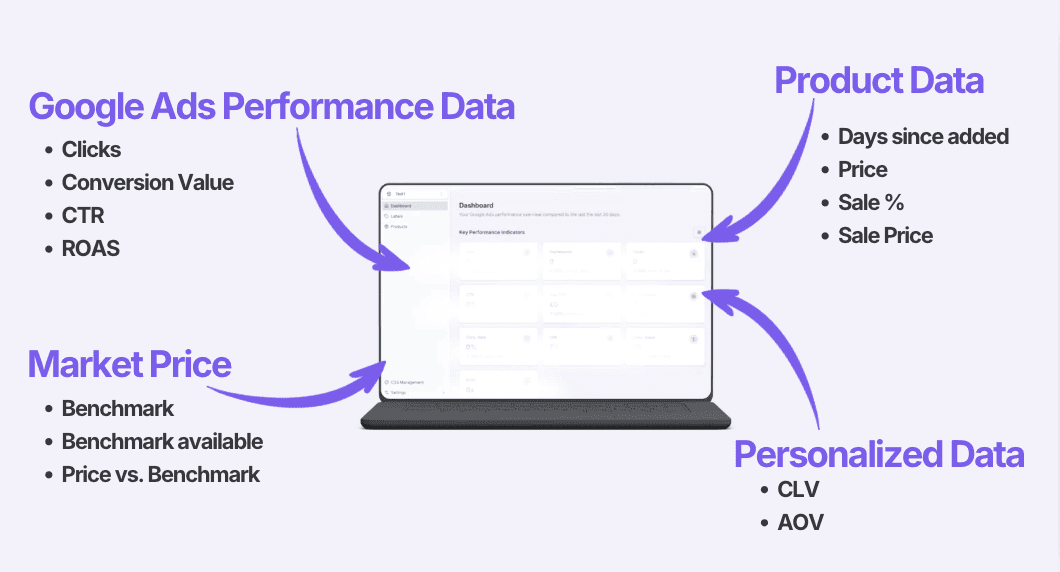
As the graphic shows, different data levels can be combined flexibly and modularly for a deep-diving PMAX segmentation.
Product Data: This level provides the basic product and catalogue attributes. This includes the current price, sale status, product types or specific custom labels.
Performance Data: Instead of squeezing products into rigid categories, you analyse the exact, historical performance data at article level here. Central data points are the advertising spend (Ad Spend), the generated clicks, the conversion rate and the achieved ROAS (Return on Ad Spend).
Optional Market Data (Market Price / Price Insights): In addition, external market signals can be included. Important in practice: These Price Insights are optional and only exist for products offered on the market by several merchants simultaneously. They indicate whether your own price is above or below the market average.
Own Data: This is the most important lever for your actual profitability. This is where business-relevant KPIs flow in that Google does not know by default, such as the exact product margin, the Customer Lifetime Value (CLV) or the average AOV of a product.
Advanced PMAX segmentation is achieved when these dimensions are intelligently crossed. With this multidimensional approach, you create an entirely unique, uncopyable growth strategy.
The Labelizer as a prediction tool: knowing what Google (yet) does not know
The Labelizer from Label Up is a software tool for your PMAX segmentation. With the infrastructure of the Labelizer, you can predict future conversion probabilities at article level by merging performance data, Merchant Center attributes and market data in real-time. While Google's smart bidding algorithm reacts purely reactively to historical campaign data within the Google network, the Labelizer acts proactively by incorporating external and internal data signals. Thus, Label Up helps you as a predictive tool for your campaign optimisation.
Why does Google's algorithm reach its limits?
Google Performance Max optimises campaigns based on machine learning. However, this algorithm operates isolated in a black box: it does not recognise when a competitor drastically lowers their prices or when your internal margin for a product changes. Google only registers the subsequent performance drop once budget has already flowed into inefficient clicks. Google reacts to the actual status of the past; it lacks the predictive capability for market dynamics.
How does Label Up break down the missing PMAX Insights?
The Labelizer targets and closes this information gap. Where Google lacks data transparency, the tool merges the necessary information. By intelligently combining Google Ads data, Merchant Center attributes and real market values (such as benchmark status), the Labelizer calculates a product's performance probability in advance:
Prediction instead of reaction: If the metric Benchmark vs. Price signals that a top product is suddenly priced too expensively compared to the market, the Labelizer anticipates the impending drop in conversions. The product is automatically reclassified before Google burns unnecessary budget.
Personalised attributes instead of just default labels: Classic scripts limit you to rigid standard labels. The Labelizer breaks this restriction. You move away from predefined templates towards a personalised PMAX segmentation based on your own business criteria. You determine the clustering rules (e.g., a combination of margin, sales history and price benchmark).
Automated scaling without effort: Despite the deep strategic control options, the system remains highly user-friendly. If you do not want to tie up internal resources for an entirely DIY strategy, the Labelizer offers fully automated Smart Templates. These take over the multidimensional structuring, allowing you to benefit from predictive clustering immediately without manual effort.
How is PMAX segmentation dynamically implemented with the Labelizer?
While the traditional, manual path leads through complex programming scripts, error-prone static tables and high internal IT effort, the Labelizer from Label Up offers a fully automated, user-friendly setup. You do not need any programming knowledge to establish a multidimensional data structure.
The setup via the Labelizer takes place in three steps:
1. Secure Data Connection: You link your Google Ads account and your Google Merchant Center directly to the Labelizer App with just a few clicks.
2. Strategy Definition: You either choose a turn-key Smart Template for an immediate start or create your own, personalised segmentation logic via the intuitive dashboard based on your individual attributes (e.g. combination of margin, price benchmark and sale status).
3. Automated Data Synchronization: The Labelizer continuously processes the data streams in the background. The calculated clusters are played back fully automatically into your Merchant Center as Custom Labels via the Content API.
This straightforward setup completely eliminates technical maintenance efforts. Your campaigns are continuously updated in Google Ads without manual intervention.
Conclusion: Why smart segmentation beats reporting from Google PMAX
A performance-based structuring of your product catalogue purely by performance is a solid first step to getting a rough overview in Google Ads. However, to scale profitably and sustainably in modern e-commerce, some potential is still left untapped here.
The decisive lever for maximum budget efficiency lies in the transition from reactive to multidimensional PMAX segmentation. Only when you link campaign performance, internal product data and real market signals on a data-driven basis do you get insights that Google PMAX cannot (yet) give you.
With the Labelizer from Label Up, you end the guesswork around PMAX Insights. Instead of waiting for Google to react after expensive misclicks, you make data-driven predictions. You move away from rigid standard templates to an absolutely personalised segmentation based on your own attributes. Thanks to the user-friendly setup, you secure long-term data sovereignty in Google Shopping, with zero technical overhead.
FAQ: Common questions about intelligent Google PMAX segmentation
What is the best way to segment Google PMAX campaigns?
The best method for profitable PMAX segmentation is the multidimensional approach. This involves not only dividing your products according to historical Google Ads performance data (clicks, conversions), but crossing this with internal data (price, sale status) and external market data (benchmark status, benchmark vs. price). This structure is stored via Custom Labels in the Merchant Center to provide Google with precise control signals.
What is the difference between reactive and predictive PMAX segmentation?
Reactive Segmentation: Exclusively uses historical data from the past (e.g. revenue of the last 30 days). It only detects problems after advertising budget has already been burned without conversions.
Predictive Segmentation: Calculates the future conversion probability of a product, taking into account price benchmarks and changes in margins. A tool like the Labelizer automatically downgrades a product as soon as it becomes too expensive compared to the market, even before the drop in performance takes place within Google Ads.
Are performance labels sufficient for Google PMAX segmentation?
Performance Labels are the perfect start to evaluate products in PMAX. However, segmentation can go even deeper. Personalised segmentation based on own attributes ensures that every product is assigned precisely to the campaign environment that corresponds to its actual profitability and current market position.
About

Label Up is a tech provider from Vienna that helps agencies and shops achieve better results with its own Google Shopping CSS and smart label-based optimization.

Other topics