>
>
Customer loyalty in the Google Shopping feed: How to use loyalty programme benefits in your ads
Customer loyalty in the Google Shopping feed: How to use loyalty programme benefits in your ads
With the Loyalty Add-On in Google Merchant Centre, you can show your loyal customers directly in ads which member benefits they receive. In this article, you’ll learn everything about the setup in Merchant Centre and how Label Up can help you with it.
The leverage of loyalty programs in e-commerce
The problem in fiercely competitive markets is interchangeability: many online shops invest heavily in exclusive members' clubs, yet in Google Shopping Ads these advantages are completely lost. Advertising measures usually focus only on the standard product price, creating a pure, low-margin price war.
The data, however, speak clearly for the strategic value of customer retention:
Higher purchase frequency: Customers who are part of a loyalty programme make, statistically speaking, twice as many purchases as non-members.
Stronger brand loyalty: The likelihood that shoppers will choose their familiar loyalty brand despite competing offers is 77% higher.
If these advantages are only communicated at checkout or via newsletter, you waste valuable leverage at the most important touchpoint: Google Search. To increase Customer Lifetime Value (CLV) in the long term while reducing Customer Acquisition Costs, these club benefits must be visible right at the first point of contact. The Merchant Center provides exactly the right leverage for this.
The Merchant Center Loyalty Add-On: how the technical setup works
A Merchant Center loyalty programme is a functional extension in Google Merchant Center that makes it possible to feed the terms of your customer retention programme directly into Google Shopping's product data structure. This gives you the technical infrastructure to manage price and shipping advantages granularly at channel level.
The setup and technical linkage take place in three key steps:
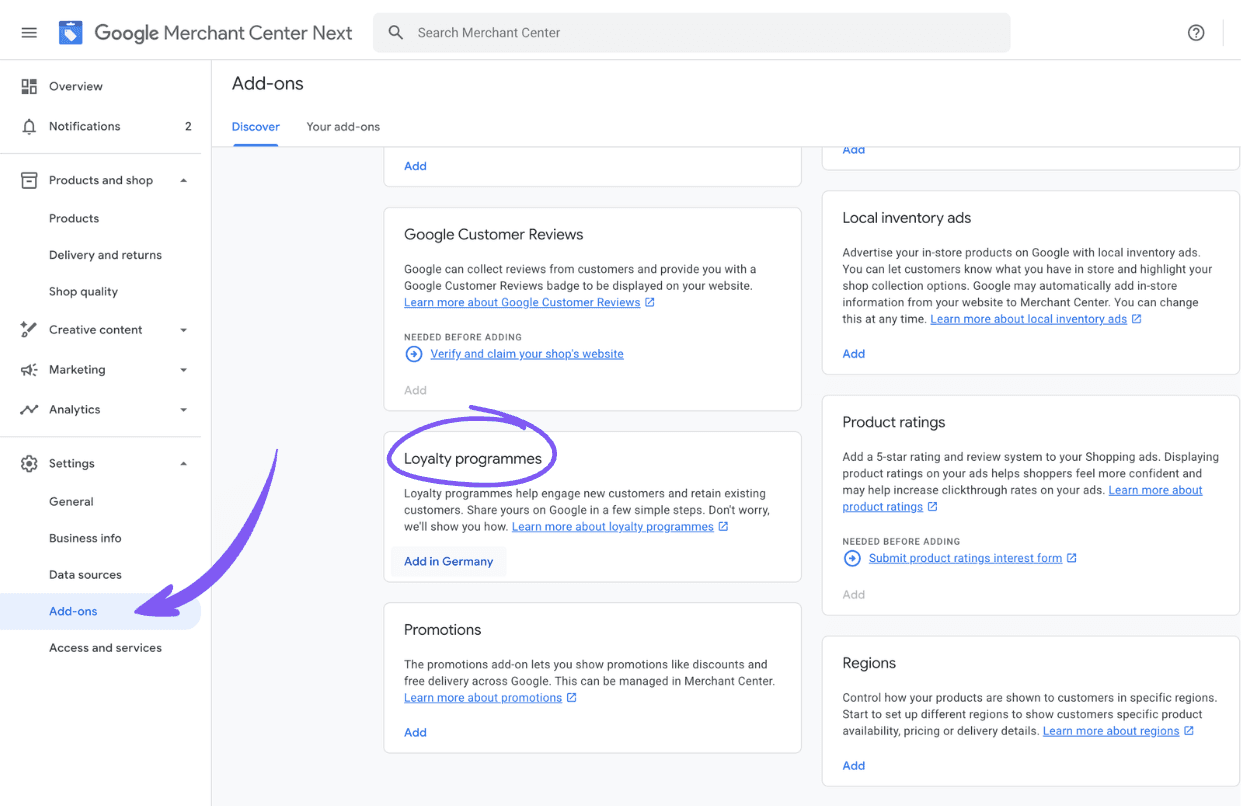
Activation in Merchant Center (or Merchant Center Next): Navigate in your Merchant Center menu to the add-ons or features and activate the loyalty programme. Here you define the foundation: the name of your club as well as the different membership levels (multi-tiers), if your programme is divided into tiers.
Data provision via the product feed: So that Google assigns the advantageous terms to the correct products, the attributes must be stored in your product data. This works either automatically via the Content API or flexibly via Supplemental Feeds. The following attributes are crucial:
loyalty_program: Identifies the specific programme and links the product with the club rules stored in the MC.Price and tier attributes: This is where the exact member prices for the respective tiers are defined, so Google can calculate the mathematical difference to the standard price.
Audience matching and serving: Google uses two logics for display. For logged-in users identified as existing members via your first-party data (for example, Customer Match lists in Google Ads), the exclusive member price is shown directly. For non-members, the ad is optimised so that the regular price sits alongside the potential club benefit, creating an incentive to register anew.
This clean feed structure ensures that your Performance Max (PMAX) campaigns can access the correct, tier-based price data without wastage.
Pricing & Shipping: which member benefits deliver the best performance
In e-commerce, nuances often decide the click. A loyalty programme offers many theoretical advantages, yet in the Google Shopping feed two primary levers have emerged as genuine performance drivers: exclusive member prices (pricing benefits) and optimised shipping conditions (shipping benefits). These two factors address the basic purchase motives of price sensitivity and convenience directly on the search results page.
The strategic effect of these benefits unfolds on two levels:
Maximising the value of existing customers (known members): When an existing club member searches for a product in Google Search, Google recognises this through matched first-party data (for example via Customer Match lists). The known member is immediately shown their individual advantage price or free express delivery in the ad. This increases the click-through rate (CTR) and conversion rate significantly, as the customer sees their familiar benefit straight away and completes the purchase without detours via competitors.
Incentivising new customers (FOMO effect): Users who are not yet members see the regular price in the Shopping ad, but directly beside it a note about the loyalty price (for example, 'member price: £X'). This visual contrast triggers the psychological effect of 'fear of missing out' (FOMO). Consumers do not want to miss out on the better price. This not only increases sales, but also grows your customer base sustainably, because the visible price advantage provides the perfect incentive to register immediately.
Flexibility through multi-tier systems The Merchant Center Loyalty Add-On does not restrict you to a rigid model. You can map complex marketing programmes across multiple tiers. Whether it is a 'basic member' with free shipping or a 'premium gold status' with 20% off - the technical feed structure allows granular allocation depending on customer segment. This enables you to control your margins with absolute precision and use your ads as a strategic tool for long-term customer retention.
A strong white-label CSS as the technical foundation for your customer retention
In order to map your loyalty programme benefits in Google Shopping Ads at all, a Comparison Shopping Service (CSS) is technically essential in the background. Every Shopping ad in Europe must be served via a CSS. Yet this often creates structural bottlenecks: while the standard model Google Shopping Europe or generic third-party CSS providers cannot keep pace with advanced data setups such as tier-based member prices, Label Up offers you the necessary technological flexibility.
With Label Up, you set up your configuration so that it maximises both the sales benefit and the measurable customer value. This is achieved through strategic advantages that go far beyond mere cost savings:
More than just the 20% CPC advantage: Of course, you also benefit here from the classic CSS advantage of up to 20% lower CPCs, as Google's internal margin falls away. Since clicks on your own CSS keyword are also completely free, you generate valuable free traffic. This saved budget immediately increases the efficiency of your Performance Max campaigns and gives you more room to promote your club benefits.
Real branding instead of generic links: When a user clicks the standard CSS link beneath your ad, on conventional providers they land on a third-party comparison platform. That weakens trust. With a white-label CSS from Label Up, the design on the CSS page remains perfectly aligned with your branding. The customer experience continues holistically here and takes the user deeper into your brand world without any break in the journey. Above all, this makes the difference for loyal fans of your brand.
Your own CSS keyword as a UX lever: You place a freely selectable keyword directly beneath your Google Shopping Ads. If a user clicks it, they land on your own conversion-optimised price comparison page, which exclusively features your products. This strengthens brand awareness and sends qualified traffic directly to your shop.
Strategic practical tip: margin control through intelligent product labelling:
A decisive lever for the economic success of your setup is the ongoing review of product performance. After all, a customer retention programme in the feed only delivers the desired ROI if reduced member prices do not eat into your margins unchecked. This is where it makes sense to secure your assortment data-driven via the Labelizer from Label Up. The tool fully automates the segmentation of your products into clear performance clusters (such as Super Champions, Champions, Waster or Loser). On this basis, you can precisely control and check which items are approved for exclusive club prices and which low-margin products you remove from the loyalty focus. In this way, you combine maximum customer retention with absolute profitability control in your PMAX campaigns.
Conclusion: the foundation for sustainable e-commerce scaling
Integrating loyalty programme benefits into Google Shopping Ads marks a strategic turning point in e-commerce marketing: customer retention moves directly to the very first touchpoint of the customer journey - the Google results page. Instead of communicating exclusive club prices or shipping advantages only in the basket or via newsletter, you now use them as the primary lever for a higher click-through rate (CTR) and lower customer acquisition costs (CAC). The data show that known members buy twice as often and that the visible price difference for non-members provides the perfect incentive to register.
Operationally, however, it becomes clear that such an advanced data setup stands or falls with the underlying infrastructure. Standard models such as Google Shopping Europe do not offer the necessary flexibility here and also create unnecessary breaks in the branding journey.
The clear recommendation based on the facts: anyone who wants to use the Merchant Center Loyalty Add-On profitably and at scale needs a tailored CSS setup. With your own white-label or keyword CSS from Label Up, you lay the technical foundation. You secure not only up to 20% lower CPCs and free additional traffic via your CSS keyword, but also a seamless, trustworthy user experience. Combined with clever product labelling through the Labelizer, you also retain full control over your margins. This turns customer retention in the feed into a real, measurable competitive advantage.
Our source: https://support.google.com/merchants/answer/12827255?sjid=2372919155887188138-EU#zippy=%2Cads
Frequently asked questions (FAQs)
What is the Google Merchant Center Loyalty Add-On?
A Merchant Center loyalty programme is a functional extension from Google that allows online shops to embed the terms of their customer retention programme directly into the product data structure. This means exclusive member prices and specific shipping benefits are served directly in Google Shopping Ads.
Why do I absolutely need a CSS to display loyalty benefits in Shopping Ads?
In Europe, every Google Shopping ad is legally and technically tied to serving via a Comparison Shopping Service (CSS). As complex feed attributes such as tier-based member prices (loyalty_program) require precise data transfer, standard third-party providers often reach their limits. A dedicated CSS provides the necessary technological infrastructure and data transparency to serve these functions without error.
How does the display work for known members compared with non-members?
Known Members: Google matches first-party data (for example via Customer Match lists). Logged-in club members see their reduced advantage price or free shipping options directly in the ad.
Non-members: These users are shown the regular standard price, but with a visual note about the potential member benefit (for example, 'member price: £X'), which triggers new registrations.
How does Label Up support online shops in implementing member ads?
Label Up provides the turnkey setup for your own white-label or keyword CSS. That means: you get full data control in Merchant Center for feeding in your loyalty attributes, benefit from up to 20% reduced CPCs, and when users click your CSS keyword, you send them to your own brand-consistent price comparison page instead of a third-party provider.
How does the Labelizer help secure the profitability of club discounts?
The Labelizer is a product data labelling tool that fully automates the segmentation of your ассортимент into performance clusters (such as Super Champions, Champions, Waster or Loser) based on live data. This allows you to check and control exactly which products are advertised with reduced club prices via custom labels in your PMAX campaigns. It prevents low-margin items from undermining your profitability.
About

Label Up ist ein Tech-Anbieter aus Wien, der Agenturen und Shops mit eigenem Google Shopping CSS und smarter Label-basierter Optimierung zu besseren Ergebnissen verhilft.

Other topics