How do you win in Google Shopping with a Double CSS Strategy?
Can you use multiple Google Merchant Centers at the same time? Do bids cannibalise each other in a multiple Google CSS strategy? Do you pay double CPC with multiple CSSs? This concern keeps many e-commerce decision-makers from implementing multi-CSS setups. However, the fear of outbidding yourself is unfounded. This article explains how the Google Shopping auction works technically, why your website domain protects you and how you can use the double CSS strategy as leverage for greater reach.

Does a Double CSS Strategy cost more CPC?
No, the parallel use of two or more Comparison Shopping Services (CSS) does not lead to CPC cannibalisation and does not result in higher click costs, as long as the campaigns run via the same website domain. This means that agencies and online shops can use multiple Google Merchant Centres simultaneously without any additional costs.
This is because Google protects merchants from outbidding themselves. When multiple CSS bids for the same retailer are received, the system determines the cost-per-click as if all bids originated from a single CSS. It is therefore easily possible to operate one or more of your own comparison shopping sites as an agency or online shop and thus submit multiple bids in the Google auction.
The widespread assumption that a "Double CSS Strategy" (or multi-CSS strategy) artificially inflates the advertising budget through internal competition is a pure myth. Indeed, running ads in parallel via different CSS partners, for example Google Shopping Europe and your own keyword CSS, enables greater reach without the click prices driving each other up.
How does the Google Shopping auction work with the Double CSS Strategy?
To understand why no cannibalisation occurs when using multiple CSS providers, it is necessary to take a look at the basic functionality of the Google Shopping auction.
A Google CSS (Comparison Shopping Service) is a price comparison site and provides the technical infrastructure required to display Google Shopping Ads in the first place.
What determines the placement of an ad in the Shopping carousel?
Every time a search query is made on Google, an auction is performed in milliseconds. The ad placement and the visibility of a product essentially depend on two factors:
The bid amount (Bid): The maximum amount a merchant is willing to pay for a click on the ad.
The quality of the product attributes (Quality Score): The relevance and structuring of product data in the Google Merchant Centre (e.g. correct titles, optimised attributes, and structured feeds).
How is the actual cost-per-click calculated?
The Google Shopping auction has historically been based on the second-price auction principle. This means that the winner of the auction does not pay their own maximum bid, but only as much as is needed to outbid the bid of the next closest competitor – usually rounded up by one cent.
Important for understanding: In a clean auction logic, you never pay your maximum bid, but always only the absolute required minimum to beat the next best competitor.
Does using the Multi-CSS Strategy lead to CPC cannibalisation?
In e-commerce, CPC cannibalisation describes a situation where an advertiser outbids themselves in price by submitting multiple bids for the same ad slot, thereby paying unnecessarily high click costs. However, when using multiple Comparison Shopping Services (CSS) in parallel for the same website domain, this concern is completely unfounded. Agencies and shops can therefore participate in and manage the auction on their own with multiple Google Merchant Centres.
The decisive factor that technically prevents CPC cannibalisation in the Google Shopping system is your website domain. Google's auction system is programmed to precisely attribute the ownership of the offers.
Identical domain as an anchor: As soon as two or more CSS providers submit a bid on behalf of the same merchant (i.e. for the same website domain), Google consolidates these bids in the background.
No bidding against yourself: You never compete against yourself in the auction. For example, if you bid £0.30 via one CSS model and £0.40 via another, you do not have to outbid yourself to get the ad placement.
Auction billing: When two CSSs submit bids on behalf of the same retailer, the winning bid and thus also the final cost-per-click (CPC) is calculated as if the bid had been submitted by one and the same CSS. The actual price is determined solely by the bid of the next best external competitor.
Are ads shown and billed twice in the Shopping carousel under the Double CSS Strategy?
Another common misconception is that using multiple CSSs leads to your products being displayed multiple times side by side in the Google Shopping carousel, meaning you pay twice for clicks.
Google's filtering mechanism in this scenario also comes into play:
Carousel clean-up: If multiple CSSs display ads for the same retailer, this does not mean that these offers are replicated or shown twice in the visible Shopping carousel. Google keeps the search experience clean for the user and filters out redundant offers from the same domain.
No additional costs: Google does not charge you more for a click on your ads just because multiple CSS infrastructures were active in the background.
The assumption that a multi-CSS strategy artificially inflates prices for advertisers is therefore false. As long as you use the same domain, your setup remains protected, efficient, and free of internal competition.
Are ads shown and billed twice in the Shopping carousel?
Another common misconception is that using multiple CSSs leads to your products being displayed multiple times side by side in the Google Shopping carousel, meaning you pay twice for clicks.
Google's filtering mechanism in this scenario also comes into play:
Carousel clean-up: If multiple CSSs run ads for the same retailer, this does not mean that these offers are shown twice in the visible Shopping carousel. Google keeps the search experience clean for the user and filters out redundant offers from the same domain.
No additional costs: Google does not charge you more for a click on your ads just because multiple CSS infrastructures were active in the background.
The assumption that a multi-CSS strategy artificially inflates prices for advertisers is therefore false. As long as you use the same domain, your setup remains protected, efficient, and free of internal competition!
What does the Multi-CSS strategy look like in practice?
To make the auction logic tangible, let's look at a concrete practical example with two competing merchants:
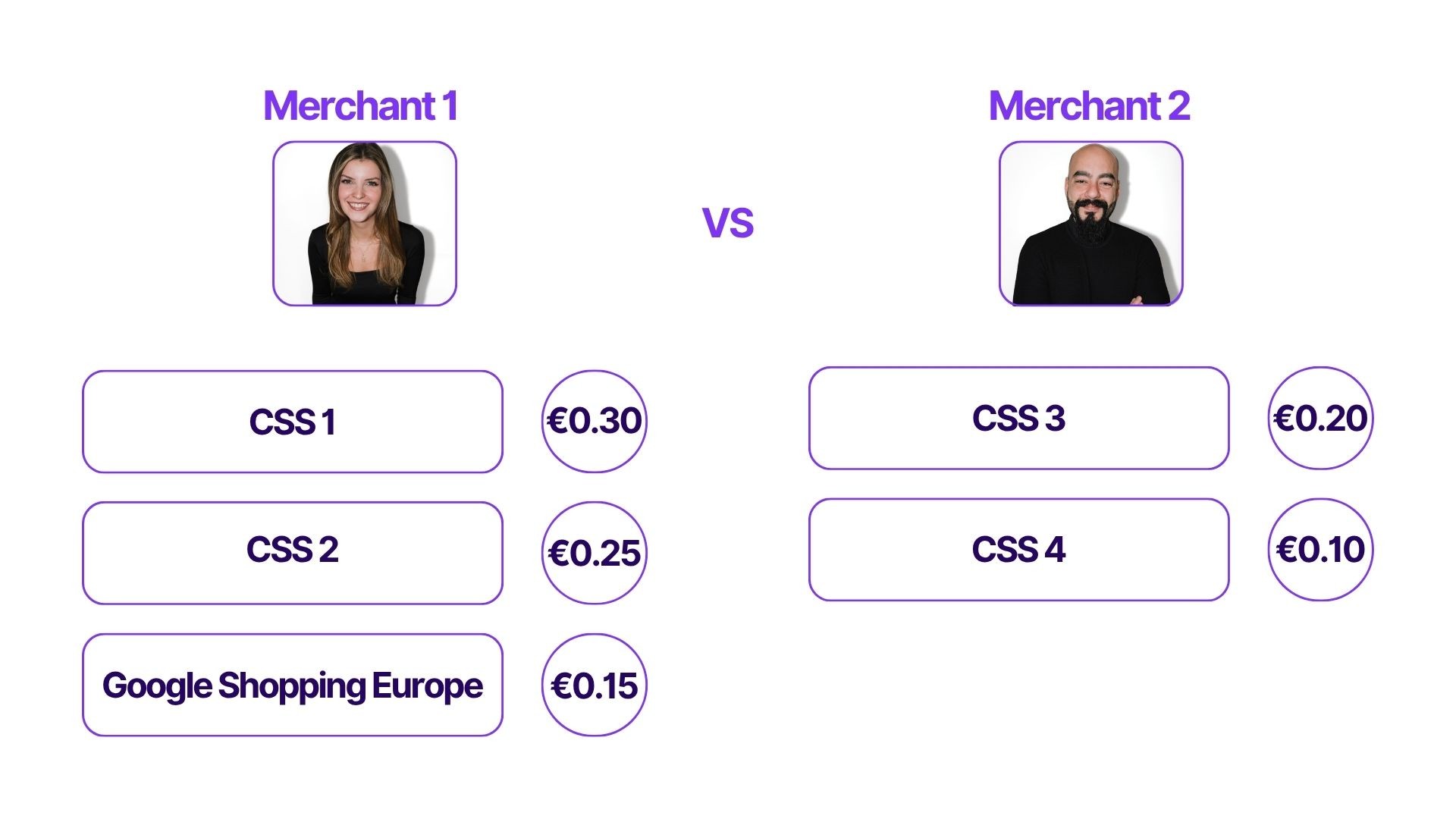
Merchant 1 uses a Multiple CSS Strategy and bids 30p, 25p, and 15p.
While Merchant 2, with their multiple CSS strategy, only bids 20p and 10p, respectively.
It is obvious that the merchant with the highest bid (30p) wins the auction. Since they must outbid Merchant 2's highest bid (20p), they pay 20p for the ad space.

Why does Merchant 1 not pay 25p, if that bid is actually the next lowest, and thus the bid to be beaten?
- Because they do not need to outbid themselves, as they are bidding with one and the same domain, just with multiple CSSs. After all, one and the same website domain does not pay twice, nor are CPCs cannibalised. You cannot bid against yourself with multiple CSSs.
Conclusion of the practical example: Merchant 1 wins by outbidding Merchant 2, but does not have to outbid the bid of their own second or third CSS. The Double CSS Strategy did not cause a single penny of extra cost. This means that it is easily possible for retailers to participate in the Google Shopping auction with multiple CSSs of their own.
Which Multi-CSS strategy offers the greatest competitive advantage in the long run?
The combination of the standard Google Shopping Europe setup and one's own, white-label-based keyword CSS (such as from Label Up) is one of the most effective methods for online shops and agencies to unlock untapped reach.
Conclusion: Why the Double CSS Strategy combining Google Shopping Europe and an own CSS is so powerful
As the practical example has shown, it is easily possible to have multiple Google CSSs simultaneously as an agency or online shop. Especially when starting out with your own CSS, it can make sense to pursue a Double CSS Strategy in order to compare costs and minimise risk, whilst still benefiting from the full advantages of having your own keyword CSS:
Take advantage of a 20% CPC saving: While Google Shopping Europe retains up to 20% of the click costs as an internal margin, this fee is completely waived when displaying through an alternative CSS partner setup like Label Up. This increases your effective purchasing power in the auction.
Additional free traffic: With your own keyword CSS, you place a freely selectable keyword directly beneath your shopping ads. Clicks on this keyword direct users to your own branded price comparison site, which presents your products on a priority basis. This traffic channel redirects potential buyers directly to your online shop for free.
Successful real-world example: The practical example of Wellcosan GmbH shows that this strategy works excellently. By switching from a standard third-party CSS to their own keyword CSS under the name "MassagePro", the brand was able to establish a reliable source of free additional traffic for its shops Venen Engel and Reboots without negatively impacting existing shopping campaigns.
For those who wish to remain independent in e-commerce in the long term, secure scalability, and maintain full control over their traffic flows, the Double CSS Strategy with an own keyword CSS offers the optimal balance of maximum display and complete cost efficiency.
Our sources:
https://www.youtube.com/watch?v=_yRJaF40aA8
https://www.youtube.com/watch?v=WyQpbjQLu6Y
Frequently Asked Questions (FAQ)
What is the Double CSS Strategy?
The Double CSS Strategy refers to the parallel use of two different Google CSSs to run Google Shopping Ads for the same website domain. Usually, the standard Google Shopping Europe setup is combined with a specialised white-label or keyword CSS to fully exploit potential reach.
Do my bids cannibalise each other if I use multiple Google CSSs?
No. Google recognises bids submitted for the same website domain and merges them. You never compete against yourself in the auction and only pay as much as is needed to outbid the next best external competitor.
Will my products be displayed twice in the Shopping carousel if I use multiple Google Merchant Centres?
No, usually not. Google filters out redundant offers for the same domain in the visible Shopping carousel to ensure a high level of user-friendliness on the search results page. The use of multiple CSSs serves to optimise the probability of winning in the auction, not to multiply identical tiles side by side.
What requirements must be met for the Double CSS Strategy?
The only mandatory technical requirement is that all CSS setups used reference the same website domain. Only in this way can Google's auction algorithm consolidate the bids without errors and rule out CPC cannibalisation.
About

Label Up is a tech provider from Vienna that helps agencies and shops achieve better results with its own Google Shopping CSS and smart label-based optimization.

Other topics