Switch to the Google CSS Partner: Full Switch or Association
Switching to your own Google CSS can be done through Full Switch or by associating your Merchant Center. The proper connection of the GMC determines performance and efficiency. With Label Up, the switch is easy, secure, and brand-compliant.

The Start as a Google CSS Partner
If you decide to become a CSS partner yourself – for example, with a whitelabel solution like Label Up – it may happen that you need to integrate existing Google Shopping accounts into your new CSS system. And that’s when it gets exciting: Depending on the technical implementation, you have two paths open to you – Full Switch or Association.
In the following article, we show you what a Google CSS partner is, how the two switch options work, which strategic considerations you should take into account, and which solution is most worthwhile for your setup – as an agency or shop.
What is Google CSS and how can I become a partner?
Before you decide on Full Switch or Association, you should understand what a Google CSS partner actually is – and why this is so relevant for your Google Merchant Center account.
A CSS (Comparison Shopping Service) is a price comparison portal that bundles products from various shops and displays them in Google Shopping. Merchants who advertise through a CSS partner instead of directly through Google receive the same ad space – but pay up to 20% less cost-per-click. This is because Google also bids as a CSS but retains a margin for itself. CSS partners waive this margin – a real performance lever.
In order to take advantage of this, your Merchant Center account must be linked with a CSS. You either use an existing partner (e.g., through an agency) or become a CSS provider yourself – for example, with a whitelabel solution from Label Up.

Google Merchant Center Tip:If you haven't linked a CSS yet, you can check and change that directly in your Google Merchant Center account under 'Shopping Ads Settings'. If you become a Google CSS partner with Label Up, you ensure that your products are served cheaper, more reliably, and often even more prominently – provided that your Merchant Center account is correctly connected. |
Overview of Google Shopping Terms

Full Switch vs. Association – Two Ways to Connect Your Google Merchant Center Account
If you want to link your Google Merchant Center account with a CSS partner, you have two options: Full Switch or Association.
Both methods allow you to benefit from the CPC advantage of a CSS partner – that is, up to 20% cheaper click prices. The difference lies mainly in the technical implementation and the degree of control.
With Full Switch, your account is fully transferred to the management account (MCC) of the CSS partner.
In the case of Association, your Merchant Center remains as it is – it is merely linked with the CSS partner.
Which option is right for you depends on how much control you want to retain, whether you are a CSS partner yourself, and what your technical setup looks like.
Full Switch to CSS Partner: How Complete Migration to the CSS Management Account Works
If you want to fully connect your Google Merchant Center account with a CSS partner, Full Switch is the best option to securely transfer all product data.
With Full Switch, your Merchant Center account is integrated into the management account (MCA) of the CSS. All shopping traffic then runs through this CSS. Your account is not deleted; it is merely integrated into the structure of the CSS partner.
The product ads will then appear under the CSS name of the Google CSS partner. If you work with a whitelabel solution like Label Up, you can choose the name of the CSS yourself. This not only offers pricing advantages but also branding benefits.
The setup is done through an official request process in the Google Merchant Center. Once the request is approved, everything runs centrally through the CSS management account.
What you need to consider:
Technical adjustment: The migration must be carried out smoothly – especially if multiple subaccounts are involved.
Avoid downtime: The switch should ideally be planned outside of peak times to minimize risks in serving.
Communication with Google support will henceforth run through the CSS partner – this can be an advantage if the partner is experienced.
Access rights: The CSS partner has full access to your Merchant Center – this requires trust and clear responsibilities.
If you are not a CSS partner yourself, you need to be aware that you are relinquishing a lot of control.
To retain control, it makes sense to become a Google CSS partner yourself. More information on this and how you can become a Google CSS partner can be found here: Become a Google CSS Partner

Advantages of Full Switch to Google CSS Partner
Centralized management: Ideal for agencies or merchants with multiple shops
Extended access for the CSS partner → faster support, better error diagnosis
Access to Google Betas & CSS-exclusive features
Whitelabel option: with your own CSS (e.g., via Label Up) strengthens your branding & positioning
Performance advantages: More control over the setup can lead to better results in the long run
No management effort for shops that are serviced by an agency that has its own CSS
Disadvantages of Full Switch to Google CSS Partner
Less control for the merchant if the implementation is done through an external CSS or a third-party provider
Technical access by third parties – trust from the merchant to the third-party provider must be present
In the event of a reversion, another clean migration must occur

Association in Google Merchant Center: CSS Connection Without Account Move
Association appears at first glance to be the uncomplicated method to link your Google Merchant Center account with a CSS partner – completely without migration or technical effort.
For with Association, your existing Google Merchant Center account remains unchanged. You simply link it via an invitation to the CSS partner of your choice – through an email link in the interface.
This means no data migration and no access by the CSS partner. The ads will run under the name of the CSS partner from now on – the rest remains as is, and your account still belongs to you. However, Google recognizes the new connection and automatically grants you the CPC advantage of up to 20%.
What you need to consider:
Active confirmation required: You must manually accept the invitation in the Merchant Center
Technically, everything remains the same, but you should check whether your CSS has been correctly linked
The CSS partner has no access, so they cannot actively help you with feed issues – unless you grant this manually
Many CSS third-party providers do not offer the option of Association and want a direct Full Switch. With your own CSS, this responsibility lies with you.
Advantages of Association in Google Merchant Center
No technical risks, no migration necessary
Full control remains with the merchant
CPC advantage usable without major changes
Disadvantages of Association in Google Merchant Center
No direct access for the CSS partner – support or troubleshooting is only possible to a limited extent
No access to CSS-exclusive features or betas
No centralized management via a CSS-MCC – with multiple accounts, it can become confusing
The CSS partner cannot 'proactively help' you, only if you actively involve them
Google Merchant Center Help Tip:
You can see in your Merchant Center under 'Shopping Ads' exactly which CSS is currently active – and whether a Full Switch or Association exists. The switch is possible at any time.
Full Switch or Association: An Overview of Differences in Switching to the CSS Partner
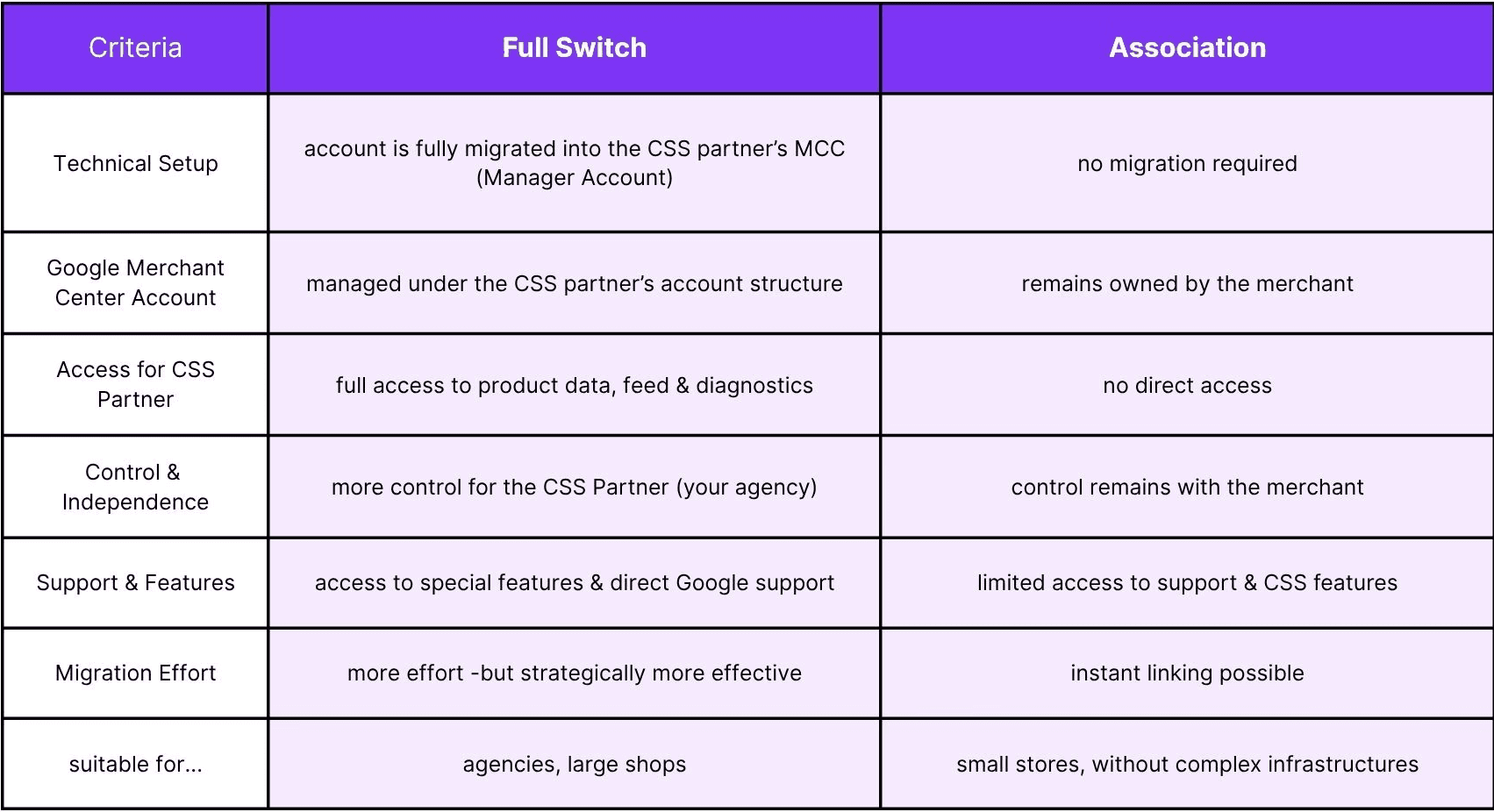
Google Shopping Tip:For agencies looking to become a CSS partner themselves with help from Label Up, a Full Switch is a logical choice. Thus, full control over the Google Shopping and PMAX campaigns lies with your agency, and your clients do not have to spend time on management. |
Conclusion: Choose the Right CSS Strategy for Your Google Merchant Center Account
Whether Full Switch or Association: Both ways bring you the CSS advantage – lower CPCs, free clicks, and more visibility.
However, in the long run, Full Switch is the far stronger solution. You benefit from technical clarity, maximum control, and a stable foundation for scalable campaigns – especially for agencies or ambitious shops, this is a no-brainer.
But beware:
If you are not a CSS partner yourself, the full control over your Merchant Center lies with the third-party provider. You are thus not only relinquishing technical responsibility but also the sovereignty over your account and product information. If you become a CSS partner yourself, the control will in any case remain with you.
About

Label Up is a tech provider from Vienna that helps agencies and shops achieve better results with its own Google Shopping CSS and smart label-based optimization.

Other topics